
Guided client workflow
Your client always knows what to do next
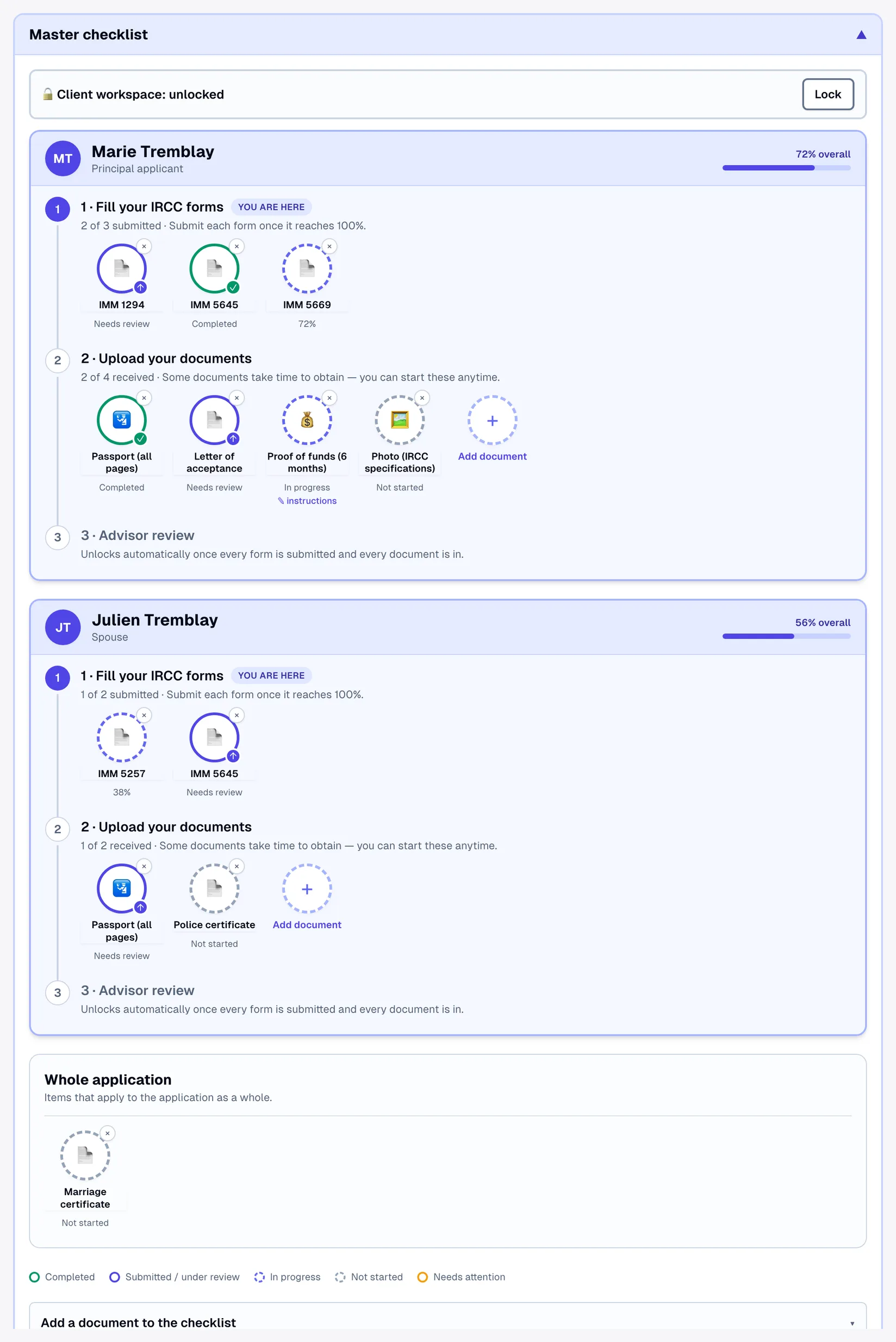
Each applicant gets their own three-step path — fill the forms, upload the documents, then advisor review — with live progress, submitted checkmarks and a lock that protects finished work.
Show full screenShow less
See it in action
Nothing incomplete gets submitted
Transcript
Marie presses Submit on IMM 5710 with the passport expiry date still empty. Lexova stops her, names the missing box and takes her straight to it; once it's filled, the form locks. On Schedule A, one month is missing from her history, and a gap can't be explained away: it has to be filled. She adds that missing month, every form is now complete and valid, and this time the whole application goes through. Your team gets a single e-mail saying it's ready for review, and since nothing incomplete gets through, fewer files come back from IRCC.
The video starts only when you press play; nothing is downloaded before that.
A checklist tells a client what exists. A path tells them where they are. Lexova gives every applicant in the case — principal, spouse, each dependant, a sponsor — their own numbered path, so a family of four sees four clear journeys instead of one undifferentiated pile of requirements.
How it works
One path per applicant
Fill your IRCC forms → upload your documents → advisor review. Steps turn green as they complete, and a marker shows where the client is right now.
Progress that means something
Each form shows real completion — required fields, repeating tables and conditional sections all counted — so 100% means finished, not "the easy part is done".
Submit, then it locks
A finished form is submitted with one button and becomes read-only, protected from accidental typing. Either side can reopen it with Modify — and the case's ball-in-court updates automatically.
Why it matters
Fewer status emails
"What's left?" is answered on screen, per person, at a glance.
Nothing gets overwritten
Submitted forms lock; a leave-guard warns before navigating away with unsaved edits.
Per-person checklists
Documents are requested from the applicant they belong to — with your instructions attached to each one.
Long-lead items start early
The steps guide without gating: police certificates can be started on day one, before a single form is finished.
Frequently asked questions
Does the third step require anything from the client?+
No. "Advisor review" turns on by itself once every form is submitted and every document is in — it is the client's finish line and your queue.
Can staff see the same view?+
Yes — your team sees the identical path per applicant, plus the controls to add documents, attach instructions and review uploads.
Explore more
Run your firm on Lexova
Start today, or talk to us about Enterprise.