
Fill IRCC portals
Your clients' answers, in the IRCC portal, in one click
The Lexova for IRCC browser extension fills the Express Entry application (eAPR) and the PR portal for representatives from the case — every form of every family member, in your own signed-in session. Each replaced answer is listed with an Undo, and it never presses Submit, Sign or Pay on its own.
See it in action
Copying answers into the IRCC portal? One click.
Transcript
Copying answers into the IRCC portal? Press Send to the extension. In your own session, Lexova for IRCC reads the application page. It fills each person's forms and saves. Every replaced answer is listed, with an Undo. It never presses Submit, Sign or Pay.
The video starts only when you press play; nothing is downloaded before that.
Your client already answered everything in Lexova. Then someone on your team spends an afternoon copying those answers, box by box, into the IRCC portal — names, dates, addresses, ten years of history for each family member — and every copy is a chance for a typo. Lexova for IRCC does that copying for you, in your browser, while you watch: it reads the page, shows what it will write, writes it, and keeps a record of everything it changed.
How it works
Send the case to the extension
On the case page, one press hands the extension a pass for that one case. It lasts 60 minutes and ends when you press Done; it reads the case, it cannot change it.
Open the portal yourself
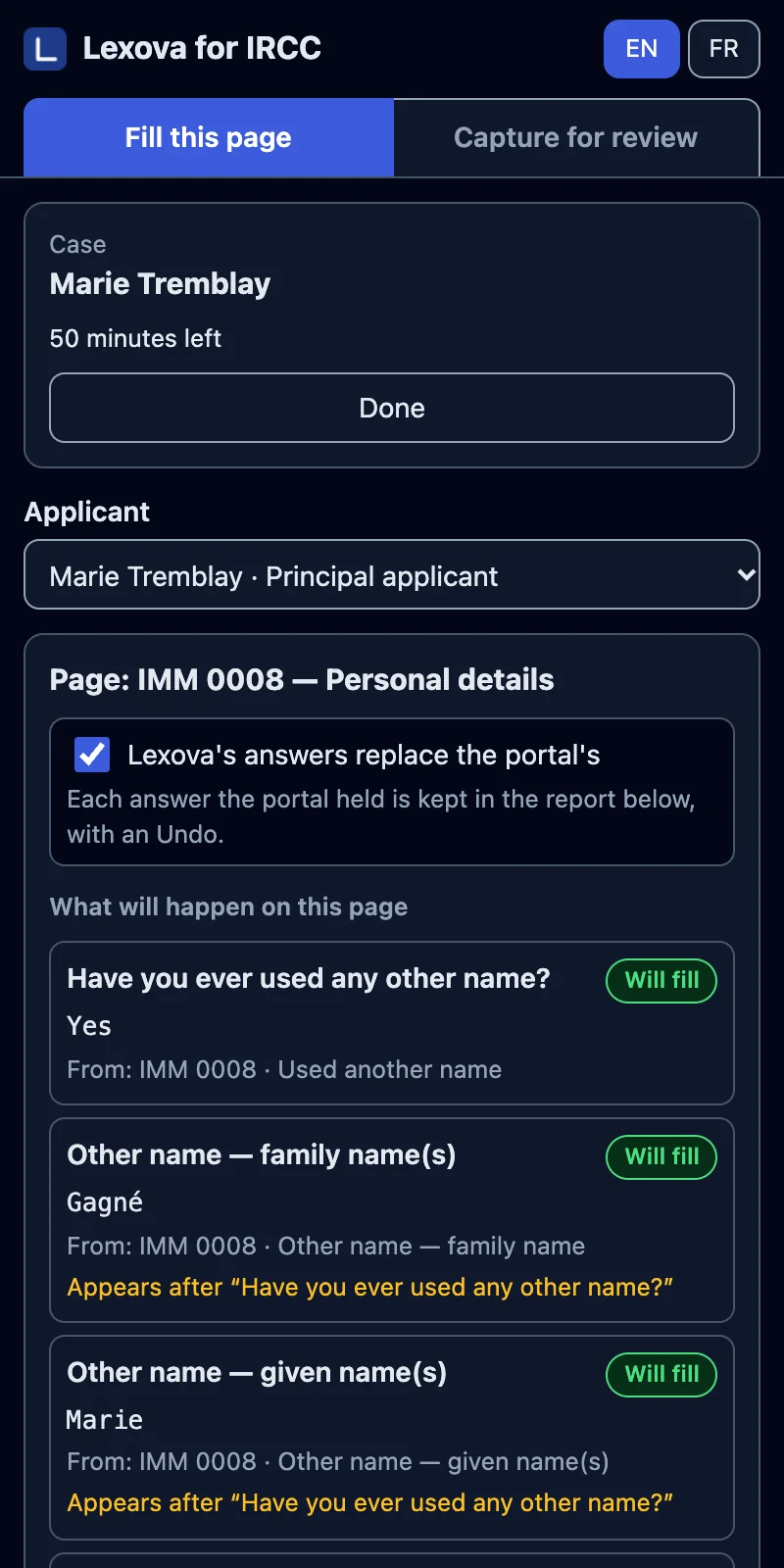
You sign in to IRCC as usual. The side panel recognizes the page and the person it belongs to, then previews each question: will fill, already right, different — you choose, or left for you.
Fill the page — or the whole application
One press fills the page; on the application page, one press fills every form of every person. Lexova's answers replace the portal's — you can turn that off — and every replacement is listed with its Undo.
Why it matters
Hours of retyping, gone
The answers your client gave once in Lexova go into the portal without anyone retyping them — every form, every family member.
Every change can be undone
Each answer it replaced is kept, before and after, with an Undo that puts exactly that value back — in a form, or inside a table entry.
It asks before anything final
It never presses Submit, Sign or Pay on its own, asks you before any Delete, and leaves declarations, consents, fees and uploads to you.
Nothing kept after the pass
The case's answers stay in your browser only while the pass lasts and are wiped when it ends. Lexova is told counts, never your client's answers.
The whole application, by itself
On the application page, “Fill the whole application” goes through every form of every family member on its own: it opens each one with the portal's own button, fills it page after page, saves it the way you would, and moves to the next. A person the case does not know is skipped and named in the report; a declaration, a consent, a signature, a payment or an upload is never opened. When it ends, the report lists each form — what was filled, what is left for you — and every answer it replaced, before and after, with an Undo that puts exactly that value back.

Show full screenShow less
Frequently asked questions
Which IRCC portals does it fill?+
The Express Entry application for permanent residence (the eAPR you complete after an invitation to apply) and IRCC's PR portal for representatives — its PA Profile and the online IMM 0008, IMM 5406, IMM 5669 and IMM 5562. Pages Lexova does not know are recognized as such and left alone.
Does Lexova see or store my IRCC password?+
No. You sign in to IRCC yourself, in your own browser. The extension works in that session; it never asks for, sees or stores your credentials, and it stops when the portal shows a sign-in page.
Can it submit the application?+
No. It moves between the steps of a form and saves it the way you would, but it never presses Submit, Sign or Pay on its own, asks your approval for a Delete, and never opens a declaration, consent, payment or upload. You review the application and submit it yourself.
What does it leave for me?+
Anything the case does not hold, anything the portal requires that Lexova cannot answer, and every declaration. The report lists each of them, form by form, so you know exactly what is left — and the portal's own messages are shown when it refuses to save a page.
Which browser, and which plan?+
Google Chrome, with the Lexova for IRCC extension installed from your Lexova account. Filling the IRCC portals is included from the Premium plan and up; the same extension also captures the application for your client's review.
What if IRCC changes a page?+
The extension compares the page with what it expects. When a page has changed, it fills only the questions it can still match with certainty and lists the rest for you — it never guesses where an answer goes.
Explore more
Run your firm on Lexova
Start today, or talk to us about Enterprise.