
Coherence check
Find the mismatch before it becomes a fairness letter
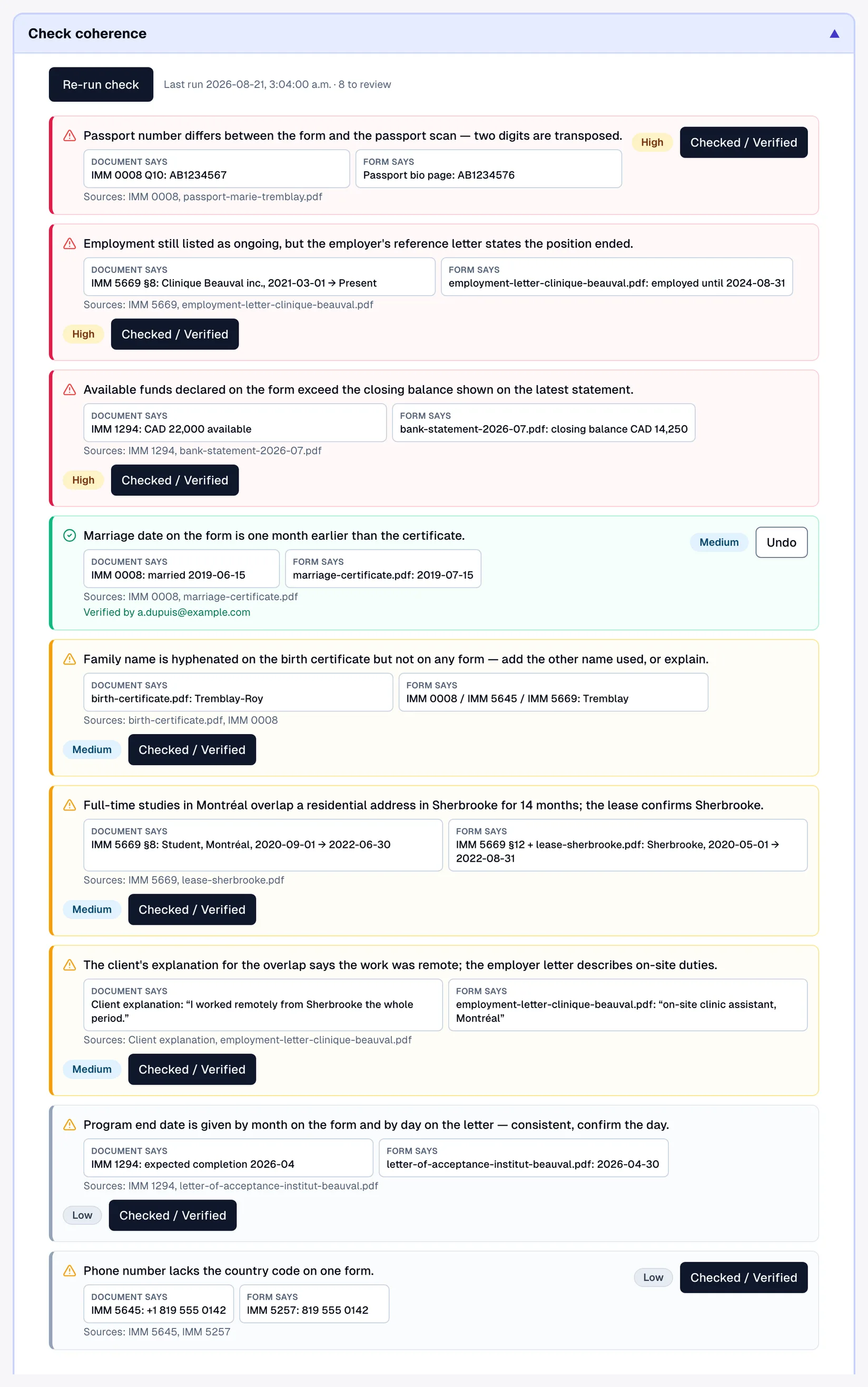
Run on demand by your team, the coherence check reads every document filed on the case — passports, employer letters, bank statements, diplomas — against the answers on every form, and lists each fact that disagrees: what the document says beside what the form says, with the source named. Your team verifies each finding before anything is filed; the check never decides for you.
Show full screenShow less
See it in action
Passport says one thing. Form says another.
Transcript
Before you file, press Check coherence: Lexova AI reads every document on the Tremblay file against every form. Each document is read only once, so running it again later is quick. First finding: the employer's letter says February, but IMM 5710 says May. Then a passport number with two digits swapped, both sides shown. Your team then checks each finding, and marks it as verified. All of it before an officer ever sees the file.
The video starts only when you press play; nothing is downloaded before that.
A passport that spells the given name one way while IMM 0008 spells it another, an employer letter from Clinique Beauval inc. that gives a start date three months later than the one entered on IMM 5710, a bank statement in a different holder's name — none of these is fraud, and every one of them reads as a discrepancy to a visa officer. The cheapest outcome is a procedural fairness letter and months of delay; the expensive ones are a refusal or a finding of misrepresentation. Catching them by hand means re-reading every document against every form, for every applicant in the family — careful work that takes hours, and the work most likely to be cut short in a busy week. Lexova's coherence check does that reading for you, on demand, and puts each contradiction in front of your team with both sides and the source — before the file leaves your office.
How it works
Every filed document, read in full
Click "Check coherence" in the case workspace. Lexova AI reads every document filed on the case — PDFs, photos and scans (password-protected bank statements included), text and office files — once, and remembers what it read, so a re-run only reads what is new. It then compares every document against the form answers, history tables, About You records, Québec intakes, job offers, LMIA entries and client explanations in a single pass. The only size limit is one file over 18 MB, which it names. Progress is measured document by document, and the comparison finishes on the server — you can leave the page and come back to the report.
Both sides of every contradiction, with its source
Each finding shows what the document says beside what the form says, a one-sentence description, a severity — high for identity, date-of-birth and passport contradictions, medium for addresses, dates, employment and education, low for the rest — and the source: an IRCC form code or the file name. A finding with no named source is dropped before you see it, and the check is instructed to infer nothing — never sex from a name, age from a photo, or marital status from a shared address — and to raise a finding only when both values are written somewhere in the file.
Verify, re-run, and know when the evidence moved
Each finding carries a Checked / Verified button that records who confirmed it and when. Re-running the check keeps those marks for any finding that reappears, so a second pass only asks about what is new. The report also remembers which documents it read: if a file is added, renamed or removed afterwards, an amber banner says so — naming any file it read that is no longer on the case — and asks for a re-run instead of letting old findings pass as current.
Why it matters
Fewer fairness letters, fewer refusals
The discrepancies an officer would query are on your screen before filing, with the evidence beside them — corrected in the form, or addressed in your submission, on your terms.
Client explanations, tested
When a client explains an overlap or a location conflict in their own words, the check tests that explanation against the documents and the rest of the file, and reports one that is contradicted or does not address its conflict.
A review trail on the file
Every finding you verify records who verified it and when; every run is entered in the case activity log with the number of findings and documents compared. If a file is ever questioned, the review that was done is on record.
Hours of cross-reading become a list
Fourteen documents against every form for a family of applicants is an afternoon of cross-checking by hand. The check hands back one list sorted by severity — with employment gaps and mere formatting or accent differences kept out, so what reaches your reviewer is a contradiction someone must look at.
Frequently asked questions
Which documents does it read, and which are excluded?+
It reads every PDF or photo (JPEG, PNG, WebP, GIF) on the case, for every applicant — documents filed against a checklist item, a document the client attached when answering one of your questions, and the unassigned scans your team dropped into the bulk intake. Only the firm's own working files stay out: the cover-letter reference files and the firm-prepared extras added to the assembled package are your work product, not the client's evidence. Password-protected PDFs are decrypted before reading.
Does it flag employment gaps?+
No. Periods without employment between jobs or after studies are normal, and the check is instructed never to report them; as a safeguard, any continuity claim not backed by an uploaded document is filtered out before it reaches you. Continuity is required only on personal-history and address-history tables — IMM 5669 Schedule A and the address histories of forms such as IMM 5532 and CIT 0002 — and those are checked deterministically by the separate gap & consistency checks. The coherence check reports a timeline issue only when two sources state contradictory dates for the same fact.
What happens when documents change after a run?+
The report stays on the case as a snapshot, with the names of the files it read. When the case's documents no longer match, an amber banner appears above the findings — naming any file it read that is no longer on the case, or telling you documents were added or changed — and asks for a re-run. Findings you had already verified keep their mark if they reappear.
How is this different from the gap checks and the client assistant?+
The gap & consistency checks run automatically on what the client typed — uncovered months, overlaps, location conflicts — and block submission until every uncovered month is filled in and every overlap or conflict is fixed or explained. The client assistant answers the client's questions from the file but does not read inside uploaded documents, and says so. The coherence check is the staff tool that does: your team runs it on demand, on the whole file, and it is part of the Lexova AI plans — see the pricing page.
Explore more
Run your firm on Lexova
Start today, or talk to us about Enterprise.