
Canadian address lookup
Type a few characters. Get a complete, correctly split Canadian address.
Canada Post AddressComplete sits on every Canadian address block of every IRCC form, on the address-history tables and on the About You intake. One pick fills unit, number, street, city, province and postal code — each in the box IRCC expects.
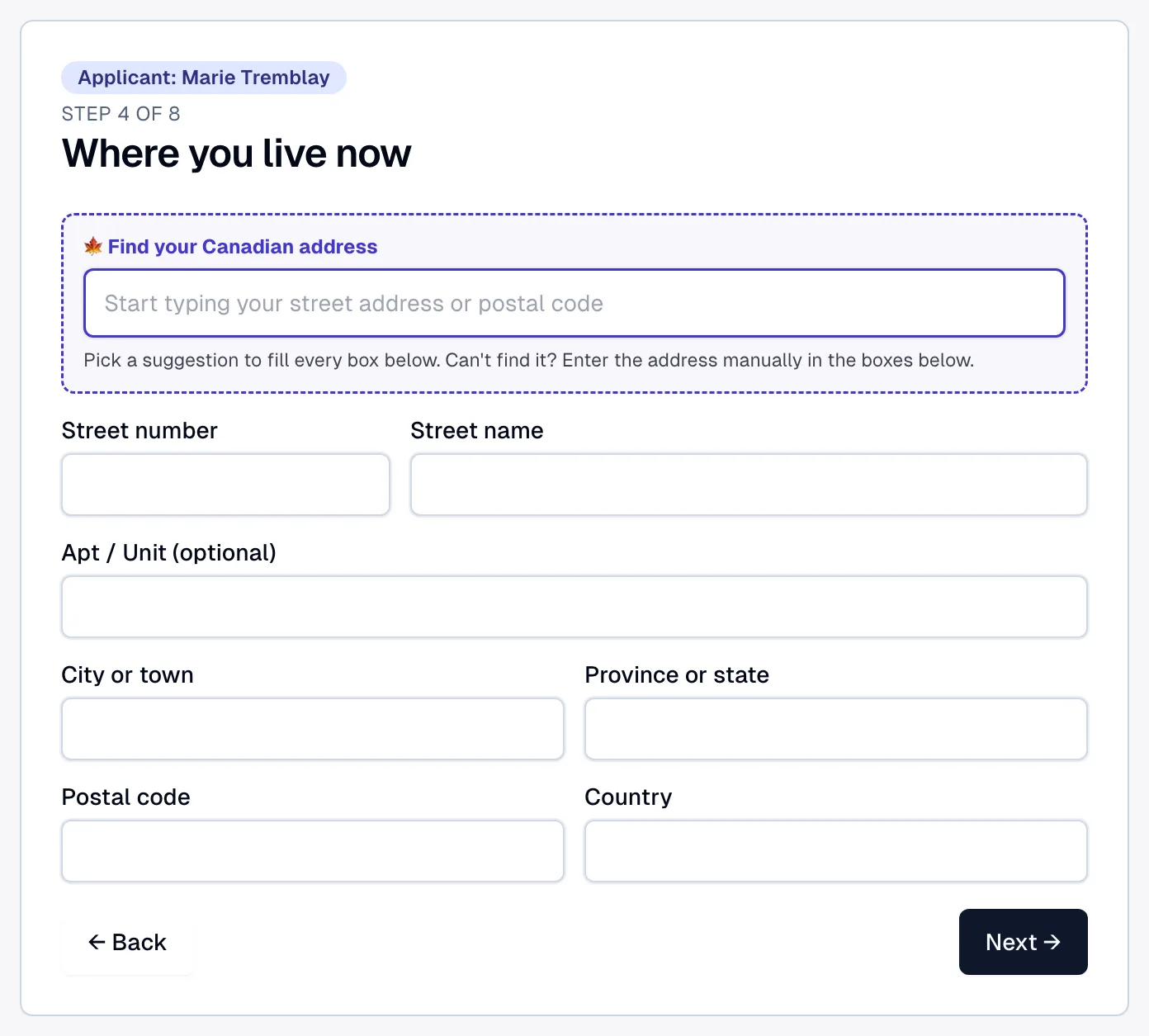
Pick a suggestion to fill every box below. Can't find it? Enter the address manually in the boxes below.
Show full screenShow less
See it in action
Eight address boxes. One search.
Transcript
IRCC wants an address split into eight separate boxes. So Marie types her street name into the number box. Lexova flags it, and submitting is blocked. The fix is a Canada Post search sitting right above the block: she types the first few characters of her address and simply picks it from the list. Unit, civic number, street, city, province and postal code each land in their own box, split exactly the way IRCC expects, on all 19 IRCC forms. Now the form is complete, and it's ready to be submitted.
The video starts only when you press play; nothing is downloaded before that.
IRCC forms split an address into as many as eight boxes — P.O. box, apartment, street number, street name, city, province, postal code, country — and clients fill them the way they write an envelope. The result is street names in the number box and postal codes in the P.O. box field, which Lexova's submission checks refuse. The lookup removes the problem at the source: one search row above the boxes, a Canada Post suggestion list, and one pick that dispatches every part where it belongs. The boxes stay visible and editable, so anything can still be entered by hand.
How it works
One search row, first in the block
"Find your Canadian address" sits above the address boxes on every Canadian block — mailing, residential, employer, school. Start typing a street or a postal code and Canada Post suggestions appear.
One pick fills every box
Unit, street number, street name, city, province, postal code and country are written to their own fields — including the tricky "1063-3909" unit-number style. A toast asks the client to glance over each box.
Intake and history tables too
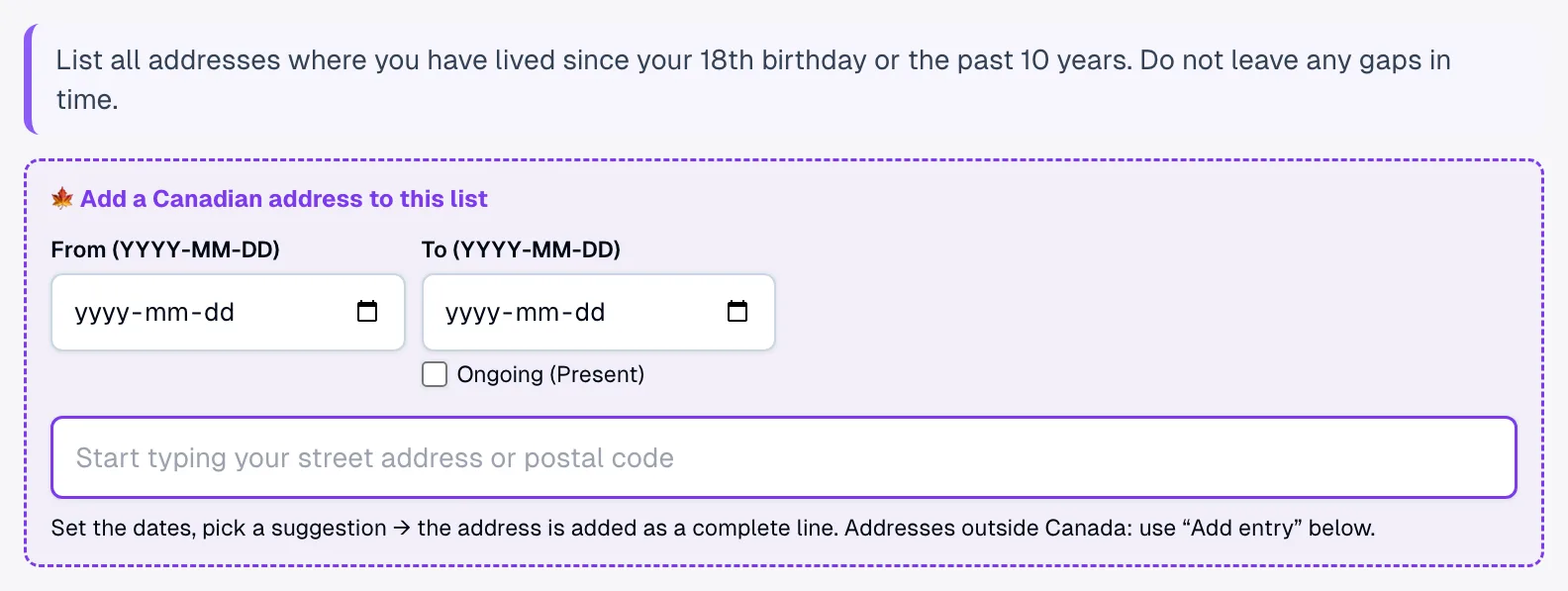
The About You intake's address step leads with the same search, and address-history tables get a card that appends a complete dated row in one pick. Single-line address fields receive Canada Post's own one-line format.
Why it matters
No more street names in the number box
The parts arrive already split, so the address-format checks that block submission simply never fire.
Every form, every block
All 19 IRCC forms in the library — multi-box address blocks, single-line address fields and the address-history tables of IMM 5669, IMM 5532 and CIT 0002.
Only the address is sent
Suggestions come from Canada Post Corporation, in Canada. Only the address text the client types is sent; the search text itself is never stored.
Foreign addresses stay manual
The search covers Canada only. An address abroad is entered box by box as before — the lookup simply steps aside.
Address-history tables too
The ten-year address history on IMM 5669 — and the address tables on IMM 5532 and CIT 0002 — get their own search card above the table: enter the From and To dates (or tick Ongoing), pick the address, and a complete row is appended with apartment, number, street, city, province and postal code each in its own cell. Foreign addresses and edits still use the table's own row editor.
Frequently asked questions
Can the client correct what the lookup filled?+
Yes. The boxes remain ordinary fields — the pick is a starting point, and every part can be edited or entered by hand.
Where does the address search happen?+
Lexova's own server relays the search to Canada Post AddressComplete for signed-in users only. The connection details never reach the browser, and Canada Post is listed as a processor in our privacy policy.
Does it cover the family-member tables?+
Not the single address cell inside the family tables of IMM 5645, IMM 5406 and IMM 5707 — those entries are mostly abroad and are typed in the row editor. Every dedicated address block and address-history table is covered.
Which plans include the address lookup?+
The Professional plan and up. On Starter, Canadian addresses are entered box by box as before, and the same address-format checks still run before submission.
Explore more
Run your firm on Lexova
Start today, or talk to us about Enterprise.