
Capture the application
The whole application, captured for your client in one click
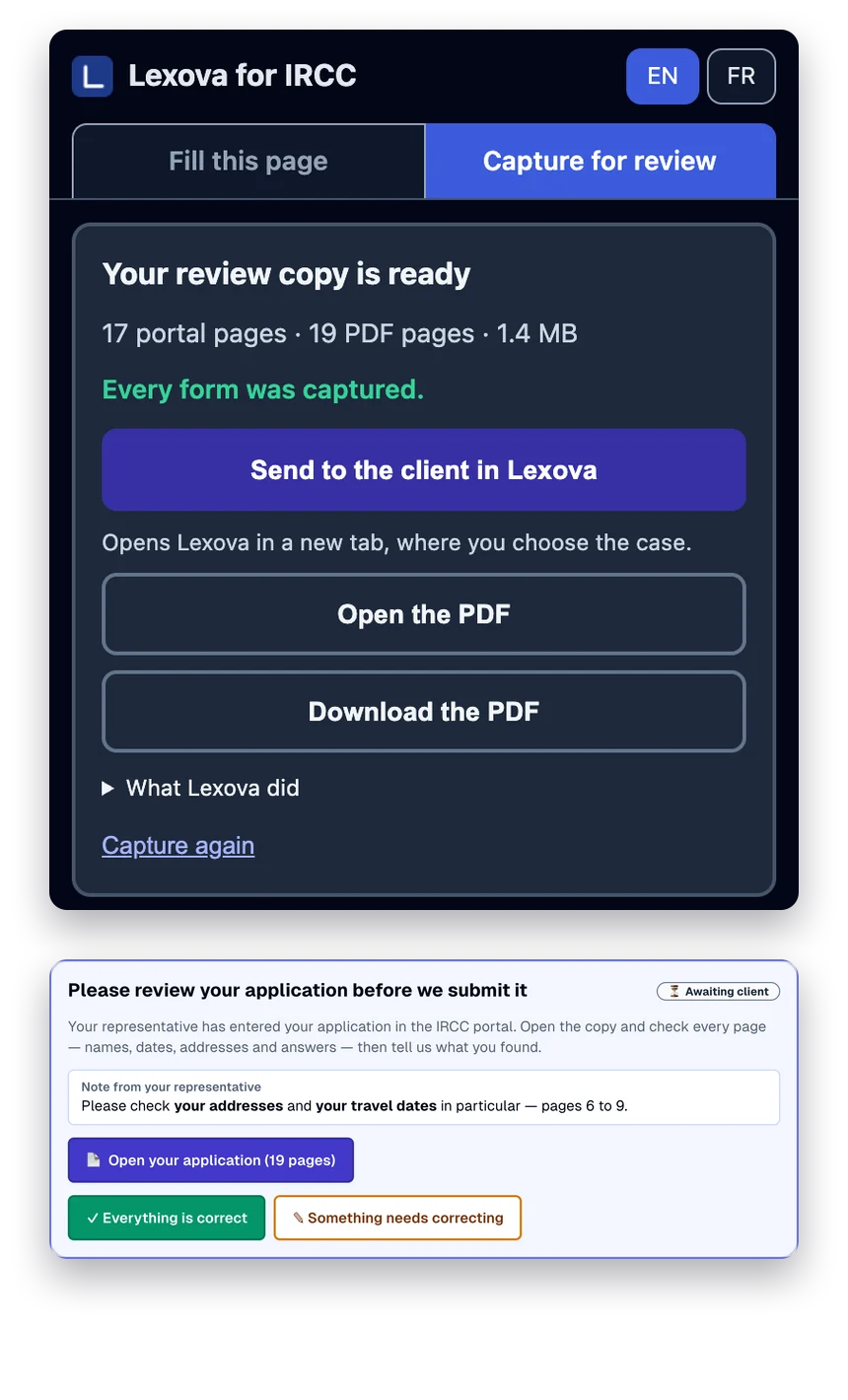
Before you submit, your client should see exactly what IRCC will receive. One click in the Lexova for IRCC extension opens every form of every family member in the portal and captures every page into one review PDF — sent to the client from Lexova, with their answer coming back to the case.
See it in action
Let your client check the application first.
Transcript
Your client should see the application first. In the portal, press Capture the whole application. Lexova for IRCC opens every form and every section. You get one review PDF, with a contents page. Send it to the client in Lexova. They confirm, or say what needs correcting.
The video starts only when you press play; nothing is downloaded before that.
Screenshotting an application by hand means opening every form, expanding every section, scrolling, capturing, pasting into a document, and doing it again for each family member — then emailing a heavy file and waiting for a reply that gets lost. Lexova for IRCC does the opening, expanding and capturing, builds one clean review copy named after the main applicant, and lets you send it to the client inside Lexova, where they confirm it or say what needs correcting.
How it works
Open the application in the portal
Signed in to IRCC as usual, open the application page — the Express Entry application or profile, or the PR portal — and choose “Capture for review” in the side panel.
One click captures everything
It opens each started form of each person, visits every section, expands what is collapsed and captures every page at full height — table entries in full — then builds one PDF with a cover, contents and a bookmark per page.
Send it to the client
Download it, open it, or send it to the client in Lexova. At the top of their workspace they answer “Everything is correct” or say what needs correcting — and you are told either way.
Why it matters
Hours of screenshots, in one click
Every page of every form of every family member, in one review copy, without anyone scrolling and pasting.
Your client signs off on what IRCC will see
The client reviews the application as it stands in the portal and answers in Lexova — a written record next to the case, not an email thread.
It only reads
It never types or changes an answer, and stops at once if anything on a page changed. It never presses Submit, Sign or Pay, and help bubbles are hidden from the pictures.
Expired profiles too
A sent or expired Express Entry profile is captured in read-only mode, every entry in full — useful for your records or a new profile.
Frequently asked questions
Does the capture change anything in the portal?+
It never types or changes an answer, and it stops at once if an answer on the page changed. It moves through forms the way you would by hand — section links, Next, Save and exit — which saves what the page already holds.
What does the client receive?+
One PDF — a bilingual cover naming the main applicant, a contents page and every captured page — at the top of their Lexova workspace, with two answers: “Everything is correct” or “Something needs correcting”, which asks them to write what.
Is anything sent without my say?+
No. The review copy stays on your computer until you choose to download it or send it to the client in Lexova.
Which portals and which plan?+
The Express Entry application and profile and IRCC's PR portal for representatives, in Google Chrome with the Lexova for IRCC extension. Included from the Premium plan and up.
Explore more
Run your firm on Lexova
Start today, or talk to us about Enterprise.