
Fill from a document
The letter says it. Don't retype it.
A job from an employment letter, a study from a diploma, a passport from a photo: Lexova AI reads the case's own documents into the entry being filled, and you check every value before it goes in.
See it in action
The letter says it. Don't retype it.
Transcript
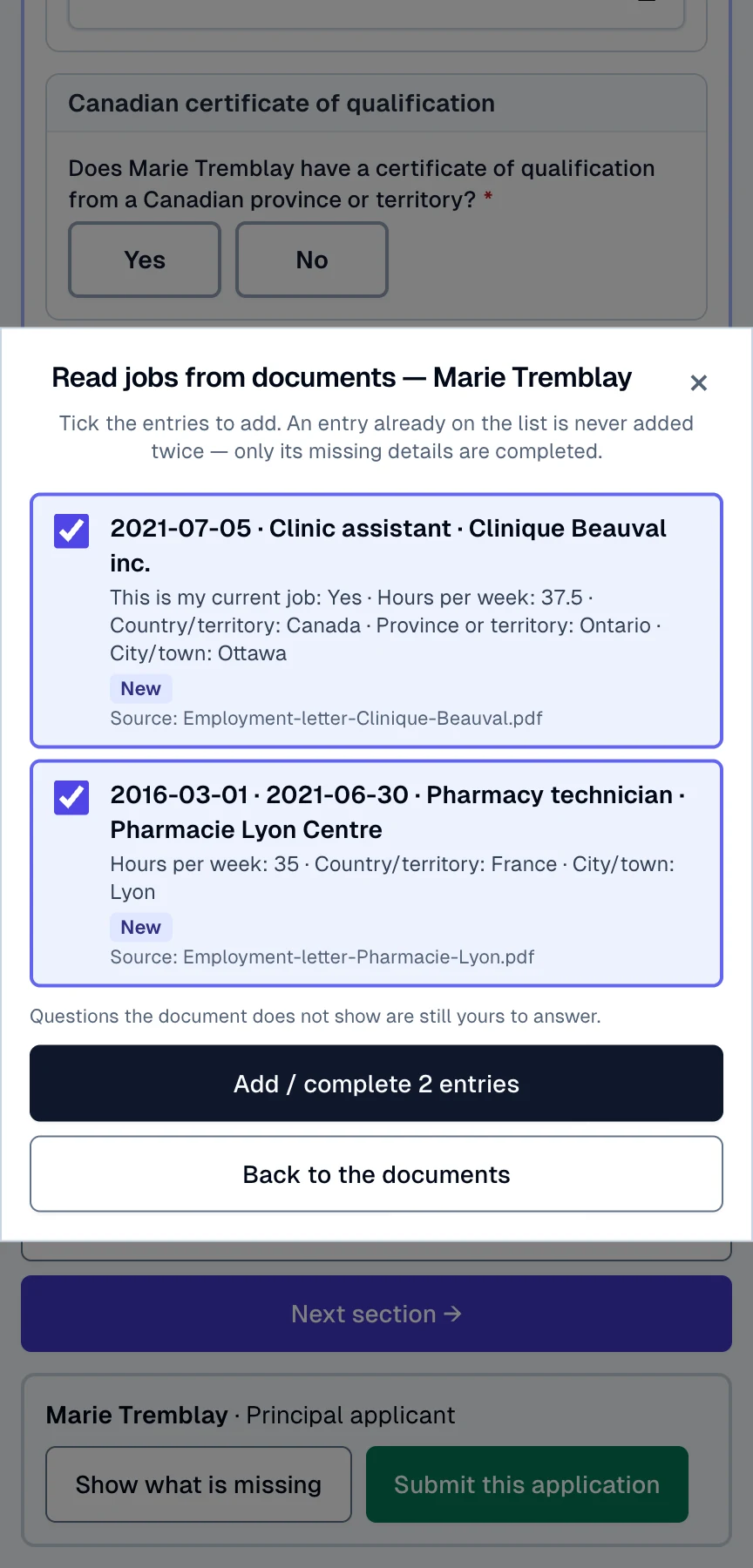
Work history is still empty, yet the letters are on file. Add from documents ticks the right letters for you. It shows every detail first: title, employer, dates, hours, city. One more click adds both jobs, newest first. Next comes Julien: open a new identity document, choose Fill from a document, and his passport photo is suggested, already read. Number, country, issue and expiry dates appear, and you check each value before it goes in. Save, and nothing is ever written without your say-so.
The video starts only when you press play; nothing is downloaded before that.
The employment letter is already on file, yet someone still types its employer, its title, its dates, its hours and its city into the work history — then does it again for the next job, the diploma and the spouse's passport, with a typo waiting at every line. Fill from a document puts a button where the typing happens: the document is read, the answers are laid out beside the ones already there, and only what you tick goes in.
How it works
Press the button where you are typing
“Fill from a document” inside an entry, or “Add from documents” beside a table — in the Express Entry application's identity documents, education, work history and personal activities, and above the job, study and passport sections of the IRCC forms.
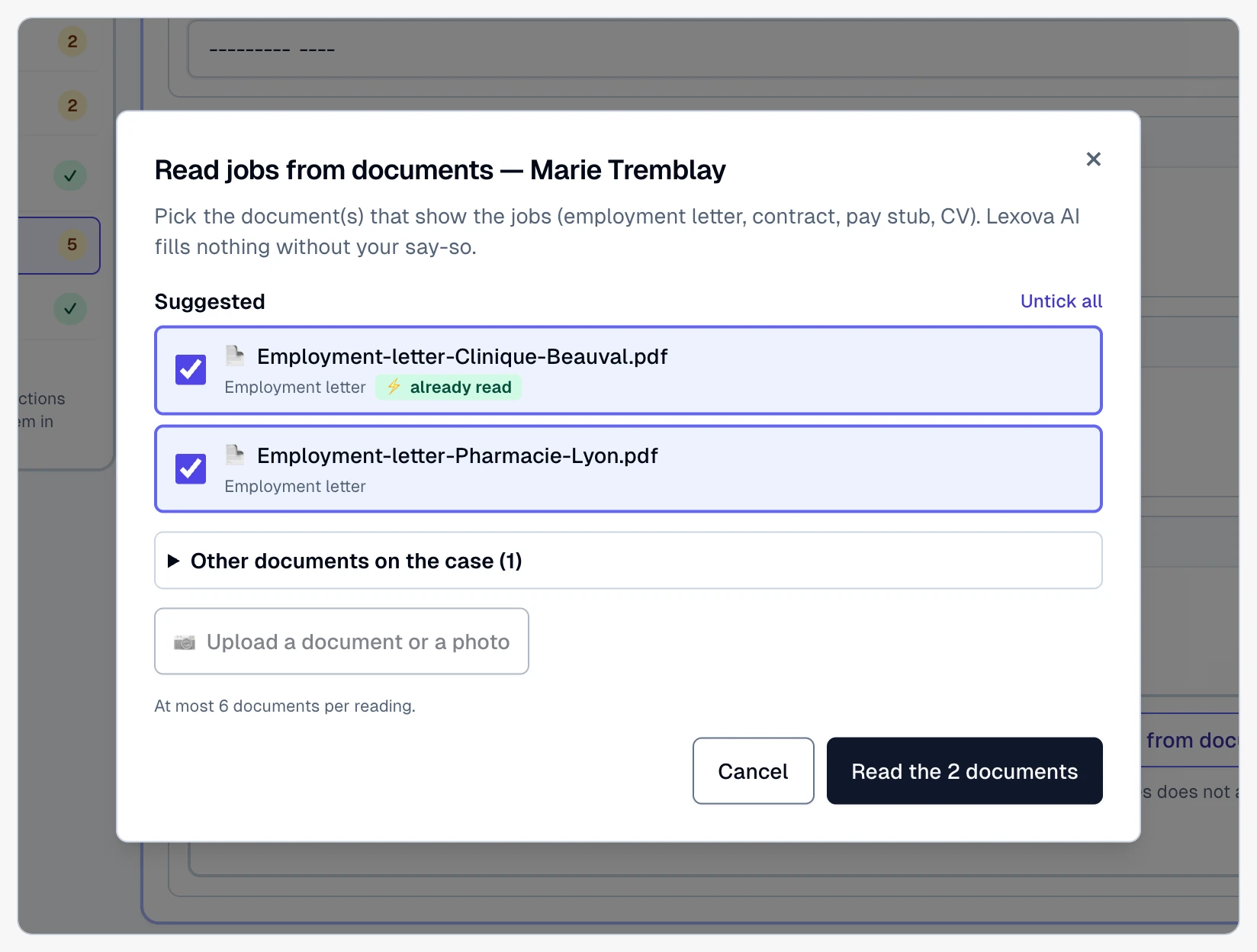
Keep the suggested documents, or pick
The documents that hold the answer for this person come ticked. Untick, pick another document of the case, or upload one — a phone photo works. A document Lexova has already read answers at once.
Check, tick, put it in
One line per value, one card per entry, each with the file it came from. Differences and uncertain readings are never ticked for you. Press once and the entries are filled, completed or added — then saved like anything you type.
Why it matters
No more retyping
Employers, titles, dates, hours, cities, schools, credentials, passport numbers and dates come from the document itself — the work moves from typing to checking.
You decide every value
Nothing is written before your review. A value that disagrees with an existing answer, or a reading Lexova is unsure of, waits for your tick.
For the client and the firm
The client uses it while filling their own application, with their own documents only; the firm's staff use it on any of the case's documents.
Lists that stay clean
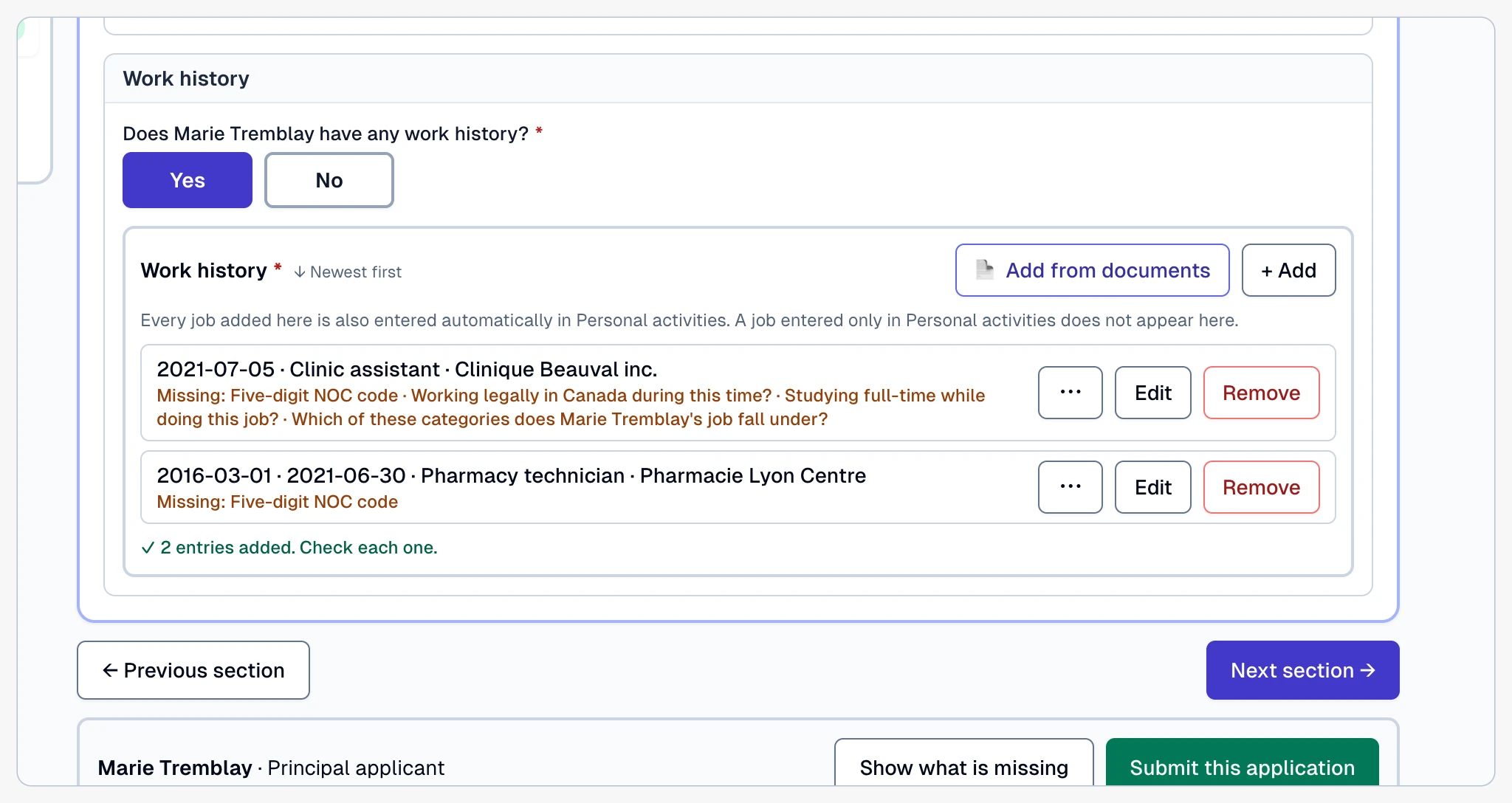
An entry already on the list is completed, never duplicated, and new entries take their place newest first — the order IRCC asks for.
The right documents, already ticked
The window opens on the documents that hold this kind of answer for this person: employment letters and contracts for a job, diplomas and transcripts for a study, the passport for an identity document. They are chosen from what Lexova has read each file to be and from the checklist line it was filed under — never from a family name two people share. Any other document of the case is one click away, and a document can be uploaded, or photographed with a phone, right from the window.
Several entries at once, never twice
“Add from documents” beside a table reads the letters, the diplomas or a CV and proposes one card per entry. An entry already on the list is recognised and only its empty answers are completed; a new one is added, and the list stays in order, newest first. Whatever the documents do not say is named on the entry, still yours to answer.
One entry, checked line by line
Inside an entry being filled, “Fill from a document” reads one document and shows one line per value. A value that matches the answer already there is marked as such; a value that differs is shown beside the answer and never ticked for you; a reading Lexova is unsure of is flagged and left unticked. Only what you tick goes into the entry, and the entry is saved like any other.

Frequently asked questions
Who can use it, and on which plan?+
The client and the firm's administrators and agents, in any case of a firm on the Premium plan and up. Employers do not see it.
Which answers can it fill?+
Jobs, studies and identity documents: in the Express Entry application's identity documents, education, work history and personal activities tables, and in the job, study and passport sections of the IRCC forms. Names, dates of birth and places of birth are proposed separately, in “Found in your documents”.
What documents can it read?+
PDFs, photos and scans already on the case — employment letters, contracts, pay stubs, CVs, diplomas, transcripts, passports — or a file uploaded from the window itself. Up to six documents per press. A pay stub never gives a start date, and a year alone is never turned into a full date.
What happens when the document disagrees with the form?+
Both values are shown side by side and the box stays unticked: the answer already there is kept unless you choose the document's value.
Can a client see the firm's documents through it?+
No. A client is only offered the documents they may already obtain in their own portal — never the firm's working files, generated packages or review copies, and never an employer's documents.
Does Lexova AI change the application by itself?+
No. It reads and proposes; you tick what goes in. The answers then go through the form's own save, its checks and its locks, exactly as if you had typed them.
Explore more
Run your firm on Lexova
Start today, or talk to us about Enterprise.