
How it works
From first intake to filed application.
Six steps — and most of the slow ones collapse into a single click.
Video walkthrough
Watch the whole workflow — four minutes
How a case moves from creation to filing — on the real screens.
Chapters
Transcript
Step one: create the case. It all starts on your dashboard, where you'll see every case your firm is working on; press Create case. First, you decide who fills it in: here, the client does, so Lexova invites her by e-mail. Enter her name, assign an agent from your team, and then pick the right program, which here is Express Entry, under the Federal Skilled Worker class. There are no IRCC forms to tick: the application is built in. Then tick the documents to request, like her language test, diploma and ECA. Next, add the family: Julien, her spouse, and Léa, their daughter, who's five years old. Each family member gets their own list of documents to request, so nobody's papers ever end up mixed together on the file, and a child is never asked for a language test. When everything looks right, you simply press Create case. The new case appears on your board right away, and the invitation is on its way.
Transcript
Step two: what your client does. Your client gets an e-mail invitation from your firm, accepts it, and lands in their own secure portal. A short About You intake comes first, her name, where she lives, and so on, and Lexova carries every answer into the application, so she never types them twice. Each person on the file has their own path: the Express Entry application, then the documents, then your review. She drops in her proof of work experience, and it lands right on the checklist item that asked for it, so nobody on your team has to sort it by hand later. The application follows IRCC's own sections, person by person. If something in her history doesn't add up, like an address and a job in two different towns, she explains it in her own words, and she can only submit once every warning is fixed or explained. When the last document is in, the file locks, and instead of a stream of notifications along the way, you get one single e-mail: the application is ready for your review.
Transcript
Step three: your review, with Lexova AI. You open the case: every form is submitted, every document is in, and the client's workspace stays locked while you review the file. Before anything goes to IRCC, one click runs the coherence check, and Lexova AI starts reading the whole file, one document at a time. Each document is read only once, then compared against every single answer in the application, for every person on the file. Each finding names its source, so you can check it in seconds: here, a passport number with two digits swapped, and an end date that's a month later than the one in the employer's letter. Where the client explained something in her history, like living in one town and working in another, her explanation sits right beside the warning, in her own words. You verify each finding, or you ask the client a question directly in the case: she answers in writing, and attaches a document if it helps. Everything stays on the file, right where you'll look for it next time, instead of getting buried in an e-mail thread.
Transcript
Step four: mark it submitted. Once you've filed the application with IRCC yourself, come back to Lexova and press Mark as submitted, then confirm; Lexova never files anything on its own. Every row on the checklist goes to Completed, for Marie, Julien and Léa alike, and the client's workspace stays locked. The case now reads Submitted, both here and on your dashboard, so anyone on your team can see where it stands at a glance, without even having to open it. And the activity log keeps the whole trail: every form, every document, every e-mail and every coherence check, with who did what and when, for the day a file is questioned. From the first invitation to the filed application, every step lives in one place, in English and in French, for you and for your clients.
Open the case, invite the parties
Create a case in seconds. Your client, the employer and every agent get their own secure portal — with live “ball-in-court” tracking so everyone knows whose turn it is. Prefer to keep it in-house? Choose “Our firm fills in everything”: no e-mail is sent to the client, and you can invite them later.
Your client fills one short intake
A guided, bilingual “About You” — name, birth, citizenship, address, passport, family. They answer once; it flows into every form.
Exactly as it appears on your passport.
24 fields across 3 forms were pre-filled from your intake. You can edit any field directly in the form below — your edit will override the About You value for that form only.
Forms and documents, assigned automatically
The case bundle pulls in the right IRCC forms, Québec / MIFI forms and LMIA — plus a tailored document checklist for the client and employer.
- 1Employer contact
- 2Work location
- 3Hours & pay
- 4Job offer
- 5Employment benefits
- 6Transition plan
- …
- Proof of business legitimacyRequired
- Signed ESDC EMP5575 — Appointment of a Third-Party RepresentativeRequired
Documents arrive — Lexova AI sorts them
Clients drop a folder or a zip. One click and Lexova AI reads each file, matches it to the right checklist item, sets aside anything it can't place for your review, and returns one exhibit PDF in your firm's order — statements per account, pay stubs newest first, work experience per job.
AI drafts the cover letter
A submission letter grounded in the real facts of the case — program, history and documents — in English or French, ready to refine.
August 22, 2026
Immigration, Refugees and Citizenship Canada
RE: Study permit application — Marie Tremblay
Dear Visa Officer,
We represent Ms. Marie Tremblay in her application for a study permit for the Certificate in Geriatric Care at Institut Beauval, an eight-month program beginning September 8, 2026.
Fill the portal, deliver — and never miss a date
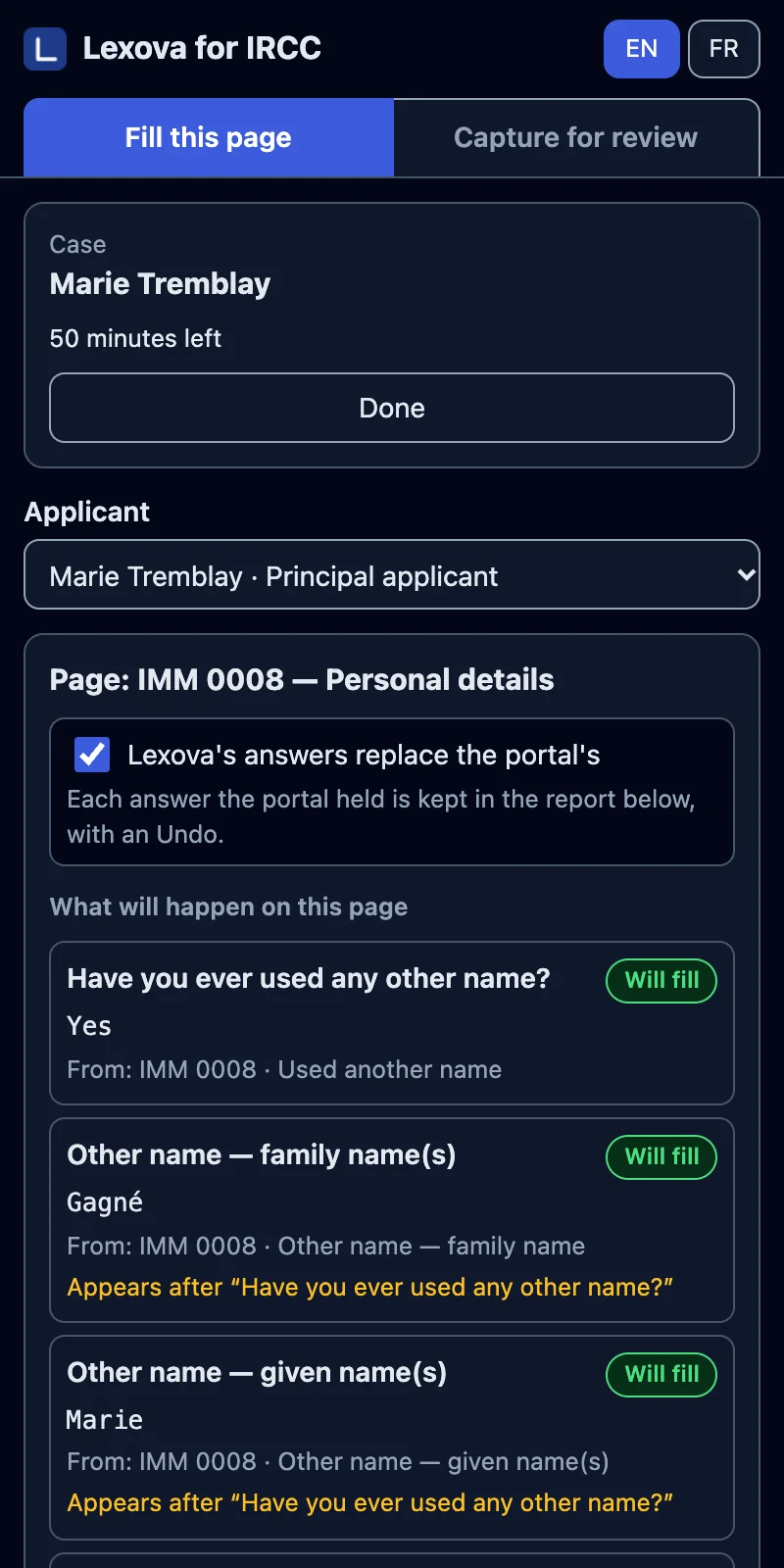
Fill the Express Entry application or the PR portal from the case in one click, then capture the whole application for your client's review (Premium plan and up) — or generate the filled IRCC and Québec PDFs and the exhibit bundle. You review and file yourself, and reminders watch every date.
Ready to save hours per file?
The first 15 days are free, with your real cases. Questions? Talk to us.