
Read from documents
The details are in the documents. Lexova reads them.
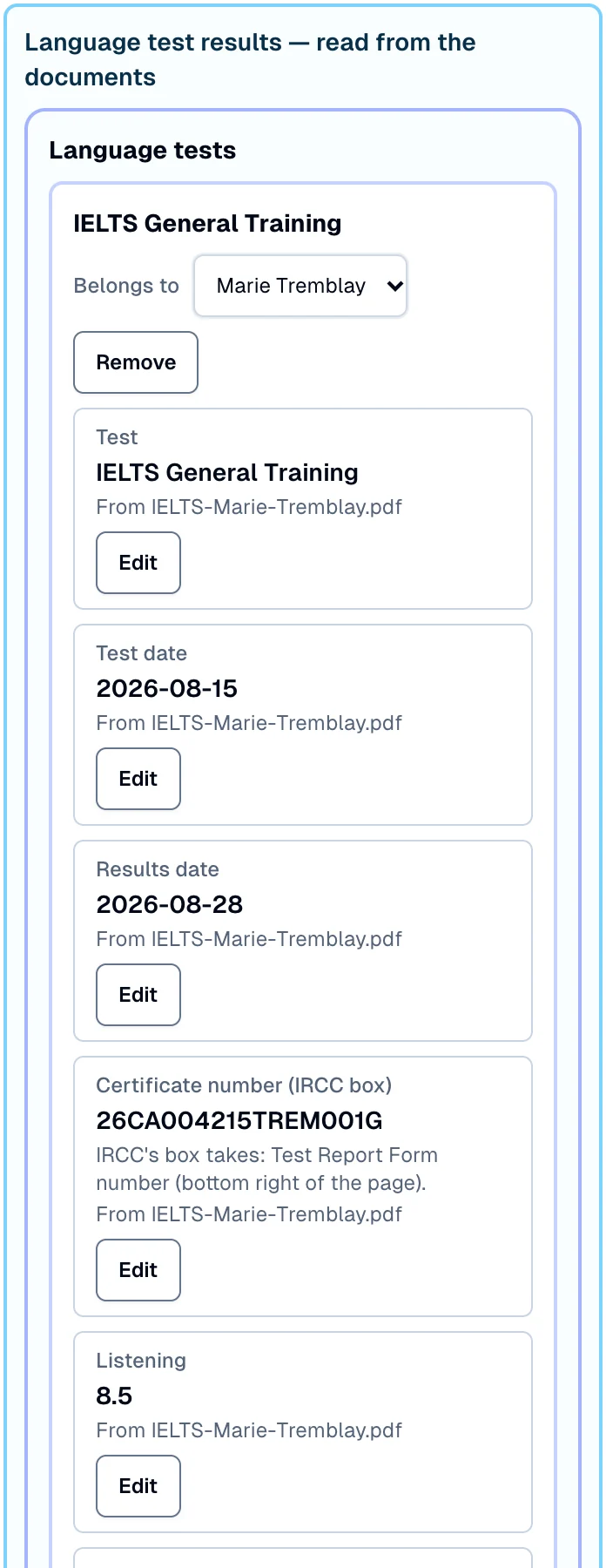
Language-test results, educational credential assessments, the Express Entry profile number, the job seeker validation code and the date of the invitation — read straight from the client's uploads, filed under the right person, each value with its source. You confirm; nobody retypes.
Show full screenShow less
See it in action
Read it from the document. Don't retype it.
Transcript
The language test result is already uploaded, so why type it again? One click, and Lexova reads the TEF Canada result: dates, scores, certificate number. Every value names the document it came from, and you can edit it. IRCC's letter supplies the profile number and the job seeker code. And for Julien, his passport fills in what the profile is missing: number, country, issue and expiry dates, each one yours to accept. One click on Use all, and the answers are in, ready for you to review.
The video starts only when you press play; nothing is downloaded before that.
A test report, an ECA and an IRCC letter carry the very numbers the Express Entry application asks for — and someone has to find them, read them right and type them in, for each person. Lexova AI reads each document once, right after it is uploaded, and puts what it found where it belongs: inside the Express Entry application's own steps, ready for you to check.
How it works
The client uploads, as usual
Test reports, ECAs, IRCC letters and identity documents arrive through the checklist or the bulk intake. Each one is read once, in the background — the upload never waits for it.
Filed under the right person
Each value lands with the applicant the document names, with the file it came from. A result Lexova cannot match waits for one click; a language test or ECA is never filed under a child.
You confirm or correct
Edit any value; your correction is kept for good, and if the document says otherwise you still see what it says. The answers then feed the application — and the portal fill.
Why it matters
The certificate number IRCC's box wants
Each test has its own rule — the IELTS Test Report Form number, the CELPIP registration number, the first part of the TEF attestation, the last digits of the TCF candidate code — and Lexova applies it.
Every value shows its source
Scores, dates and numbers carry the name of the file they were read from, so checking one takes a glance.
Nothing filled behind your back
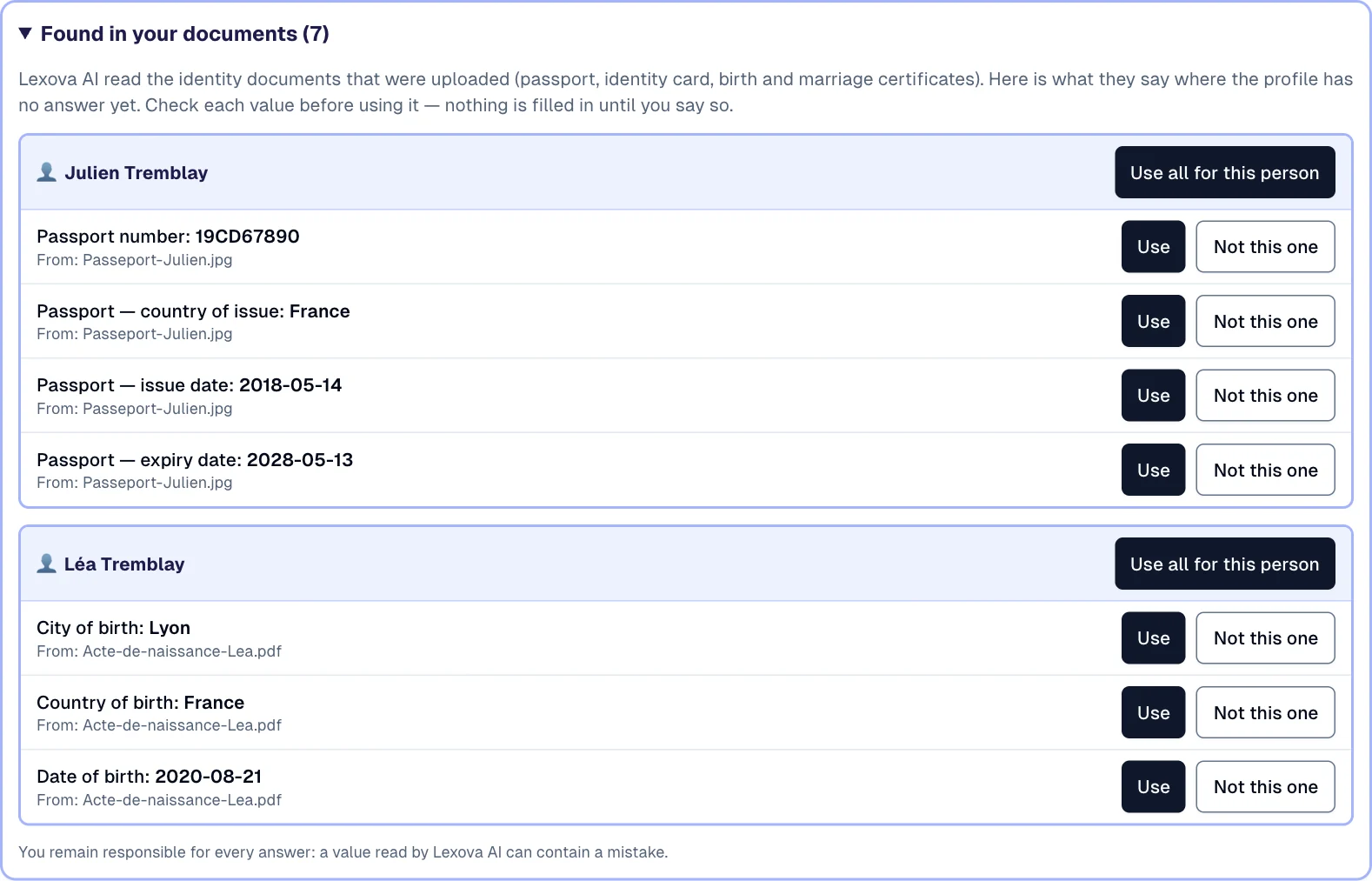
Identity details are only offered where the profile is still empty, and nothing is written until someone presses Use.
Read once, never twice
Each document is read a single time; reading again only refreshes what the document says, never your corrections.
Identity details, found in the documents
Passports, national identity cards, birth and marriage certificates are read too. Where a family member's profile has no answer yet — a passport number, an issue or expiry date, a city of birth, a date of marriage — Lexova shows what the document says, with the file it came from. One press of Use fills the profile, and every form follows; “Not this one” sets a suggestion aside for good.
Frequently asked questions
What exactly does Lexova read?+
Language tests (IELTS, CELPIP, PTE Core, TEF Canada, TCF Canada): test and result dates, the score for each skill and the certificate number. Educational credential assessments: organization, reference number, date, credential and Canadian equivalency. IRCC letters and profile printouts: the Express Entry profile number, the job seeker validation code and the date of the invitation to apply. Identity documents: names, dates and places of birth, document numbers and dates, the date of a marriage.
Can a value be wrong?+
Yes — a value read by Lexova AI can contain a mistake, which is why each one shows its source and stays editable, and why you remain responsible for every answer. An off-scale score is flagged, and a certificate number in the wrong format for its test is pointed out.
Does the client see these values?+
The test results, assessments and profile details read from documents are for your firm: they appear inside the Express Entry application for your team to confirm. Identity details found in identity documents are offered in “Found in your documents”, where your client can also confirm them for their own profile.
Which plan includes it?+
Reading information from documents is included from the Premium plan and up.
Explore more
Run your firm on Lexova
Start today, or talk to us about Enterprise.